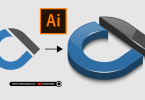
Building a Brand of Unity: Community Logo Design Tutorial
Are you looking to create a logo that represents togetherness, teamwork, and unity? In the world of graphic design, circular patterns and interconnected figures are the strongest symbols for community-driven brands.
In today’s post, we are diving into Adobe Illustrator to create a community connection logo. This design features stylized figures linked in a harmonic circle, utilizing a trustworthy blue color palette.
Watch the Step-by-Step Tutorial
You don’t need to be an expert to create this complex-looking design. In this 4-minute video, we break down the process using basic geometric shapes and the power of the Repeat Tool.
Don’t Want to Start from Scratch?
If you are working on a deadline or need high-resolution files immediately, you can grab the premium version of this logo. The download includes fully editable AI, EPS, and SVG files, along with a transparent PNG.
Key Design Techniques Used:
- Geometric Precision: Using the Ellipse tool to create the base forms.
- Radial Symmetry: utilizing the Rotate command to ensure perfect spacing.
- Pathfinder Tool: The secret to merging intersecting lines into clean, solid shapes.
Whether you are designing for a non-profit, a social app, or a corporate team, this style of logo communicates stability and growth.
Credits:
Design by CreativeAlys – Don’t forget to share your creations with #CreativeAlys!
You May Like
Vector Floral Artwork in 6 Color Themes
Check out these beautiful floral artwork in 6 astonishing color palettes. You can shine your graphic designs with these floral...